
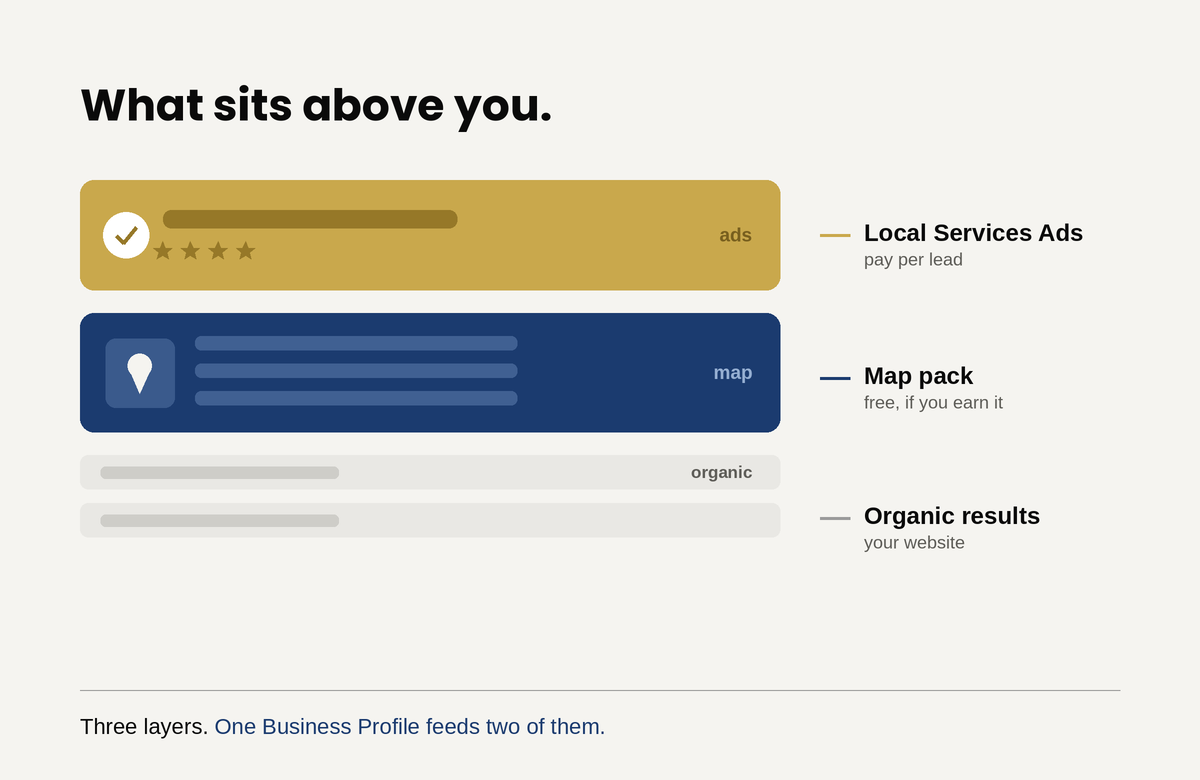
There is a stack at the top of every local search result, and most business owners have never looked at it as a stack. Local Services Ads sit at the very top, above everything. The map pack sits below them. Organic results sit below that. Three layers, three different sets of rules, and one business trying to appear in all of them.
Here is what changed, and why it matters more than any individual optimization tip. Those layers used to be separate projects with separate inputs. They are not separate anymore. A verified Google Business Profile is now mandatory to run Local Services Ads at all, and your Business Profile reviews have become your Local Services Ads reviews. There is no separate review system. The free listing you may have half-configured and forgotten now determines whether your paid ads run, where they rank, and what each lead costs you.
That single change reorders the priorities. If your Business Profile is weak, you cannot buy your way past it.
The layer everyone skips: what actually drives the map pack
Google states plainly that local results rest on three factors: relevance, distance, and prominence. Understanding what each one means, and which you can influence, saves a great deal of wasted effort.
Relevance is how well your profile matches what somebody searched. This is the most directly controllable factor and the most commonly neglected. Google matches on the information you give it, so an incomplete profile is a profile Google cannot match confidently.
Distance is how far your business sits from the person searching. This is the uncomfortable one, because it is largely outside your control, and it explains the question owners ask most often: why do I rank in one neighborhood and disappear in the next? Proximity is why. A competitor two miles closer to the searcher has an advantage you cannot optimize away. You can offset it with stronger relevance and prominence, but you cannot eliminate it, and any agency promising uniform rankings across a wide metro is overselling.
Prominence is how well known your business is, and Google names reviews and links from other websites as inputs. This is the slow compounding factor, and the one with the highest ceiling.
What to actually fix on the profile
The work here is unglamorous and mostly consists of filling things in completely and then keeping them current.
Categories. Your primary category carries more weight than almost anything else on the profile. Choose the most specific one that describes your core service rather than a broad one, then add relevant secondary categories. Businesses routinely pick something vague and wonder why they do not surface for their actual specialty.
Complete every field. Services with descriptions, hours including holiday hours, attributes, business description, products where applicable. Each field is a signal Google uses to judge relevance, and empty fields are silence.
NAP consistency. Your name, address, and phone number must match exactly across your website, your profile, and every directory listing. Inconsistent details are a common and quiet drag on local visibility.
Photos, and more of them than you think. This matters twice over now. Photos affect user preference in the map pack, and Google’s Local Services documentation states that higher quality profiles, including those with images, may rank higher and may pay lower costs per lead. That is a rare case of a free action lowering a paid cost.
Reviews, continuously. Not a burst of ten and then nothing for two years. Volume, recency, rating, and your responses all feed prominence. This is also the single highest-leverage habit in this entire article, for reasons the next section makes clear.
Service areas set honestly. Listing every town within fifty miles does not extend your reach. It dilutes your signals. List where you actually work.
Local Services Ads: what they are and what changed
Local Services Ads work unlike anything else Google sells. You pay per lead rather than per click, so a person who sees your ad and does nothing costs you nothing. There is no keyword bidding and no ad copy. Google verifies your license and insurance before your ads run at all, which is why setup takes days to weeks rather than an afternoon.
Several things changed in late 2025 that make most older guides unreliable. Google consolidated the Google Guaranteed, Google Screened, and License Verified badges into a single Google Verified blue checkmark. The associated money-back guarantee was discontinued. And the connection to your Business Profile became mandatory rather than optional: an unverified or suspended profile means your ads do not run.
If you are working from a checklist written before this, parts of it are wrong.
How LSA ranking actually works
Google’s own documentation on Local Services ad rankings lists what feeds the auction, and the list rewards operational discipline more than budget.
Your bid and budget matter, but they are not the whole story. Google explicitly names responsiveness, noting that missed calls may negatively affect it. Profile quality is a named factor and includes your rating, your number of reviews, your average response time, your use of high quality images, and the verification checks you have completed. Search context and how relevant your business is to the specific query round it out.
Read that list again with the earlier point in mind. Reviews and response time appear in both systems. The work you do on your Business Profile is simultaneously the work that improves your paid ad ranking and lowers your cost per lead. That is the argument for treating them as one project rather than two.
Running LSAs without wasting money
Budget is set weekly rather than daily, and Google’s documentation on how leads work explains that you can exceed the weekly average in a given week but never the monthly maximum. Size it against capacity: decide the most you will pay for a lead, multiply by the number of jobs you can actually service in a week, and start there rather than guessing high.
Set your service area conservatively at first. Paying for leads outside your profitable radius is the fastest way to conclude the channel does not work.
Answer the phone. This is not a soft recommendation. Responsiveness is a scored ranking factor, missed calls hurt your position, and every unanswered lead you already paid for is pure loss. Enabling message and booking leads gives customers a way to reach you outside business hours, which Google notes can increase lead volume during nights and weekends.
Dispute invalid leads every month. Spam calls, wrong numbers, and contacts outside your service area can be reported, and credits reduce your real cost per lead. Most businesses never do this, which means most businesses overpay.
Keep asking for reviews. Since your Business Profile reviews now drive your ad ranking, review generation stopped being a reputation exercise and became a media buying lever.
The trap that catches most businesses
Everything above assumes the leads become customers, and that assumption is where the money usually disappears. You can win the top of the local stack, appear above every competitor, and still lose the job, because what happens after the lead arrives is a separate system entirely.
This is more punishing with Local Services Ads than with almost any other channel, because you paid for that lead directly. A missed call is not just a lost opportunity, it is a purchased opportunity you threw away, and it damages your ranking on top of that. In LSAs, slow follow-up costs you twice.
The same applies to where the traffic lands. Your profile and ads can be immaculate while the site they lead to fails to convert, and no amount of local visibility fixes that.
Where to start
The order matters, because these build on each other.
Claim and verify your Business Profile if you have not, since nothing else works without it. Complete every field properly, with the correct primary category and honest service areas. Build a real review habit, meaning a consistent process for asking rather than an occasional push. Add photos, generously. Only then evaluate Local Services Ads, because a weak profile makes them expensive and a suspended one makes them impossible.
That sequence saves money. Businesses that skip to the ads while their profile sits half-finished pay more per lead for worse placement, then conclude the channel is broken.
The free listing and the paid ads are no longer separate projects. Your Business Profile is the foundation of your organic local visibility and the input that determines your paid ad ranking and cost. Fixing it improves both at once.
Most local businesses have a profile somebody set up years ago and nobody has touched since. That profile is now doing more work than they realize, and doing it badly. Start there, before you spend a dollar on ads.